
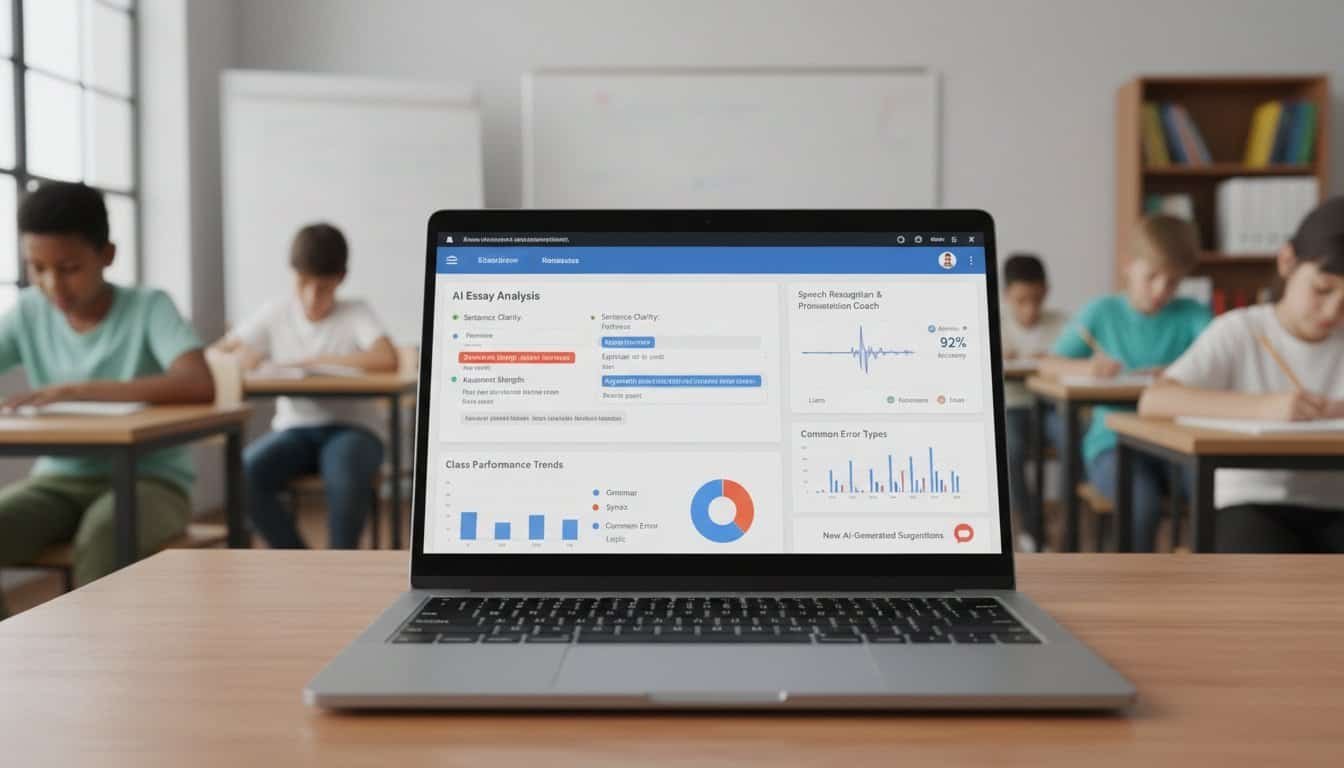
Google Classroom New AI Features: How Teachers Automate Feedback Without Losing Control
Google Classroom’s AI features let you automate feedback while maintaining complete pedagogical control. You’ll review AI-generated responses before delivery, customize parameters to reflect your teaching philosophy, and reduce grading time by 40% without sacrificing quality. The system analyzes student performance patterns, generates targeted comments in your voice, and provides personalized learning recommendations based on individual comprehension levels. These adaptive assessment models prioritize assignments requiring your expertise while handling routine evaluations automatically, ensuring your educational authority remains paramount throughout the enhanced workflow.
Key Takeaways
- AI analyzes student responses against predetermined criteria to generate targeted feedback while maintaining the teacher’s voice and philosophy.
- Teachers review and customize all AI-generated responses before delivery, preserving their pedagogical authority and educational control.
- Automated systems categorize submissions and prioritize assignments, allowing teachers to focus on complex evaluations requiring human expertise.
- AI adjusts feedback complexity based on individual performance patterns, providing immediate guidance for self-directed learning pathways.
- Performance analytics identify knowledge gaps and learning preferences, enabling systematic instruction differentiation without compromising teaching quality.
AI-Powered Feedback Generation: Streamlining Teacher Responses
How can teachers provide meaningful feedback to dozens of students while managing increasingly heavy workloads? Google Classroom’s AI-powered feedback generation offers a systematic solution by analyzing student responses against predetermined criteria and generating targeted comments. You’ll find the system examines submission patterns, identifies common errors, and produces personalized suggestions that maintain your teaching voice.
The technology employs adaptive assessment models that adjust feedback complexity based on individual student performance levels. When you review AI-generated responses, you can modify, approve, or reject suggestions before delivery. This process preserves your pedagogical authority while reducing time spent on routine corrections.
Most importantly, the system supports self directed learning pathways by providing immediate, actionable feedback that guides students toward improvement without waiting for manual teacher review. Research indicates teachers using AI feedback tools reduce grading time by 40% while maintaining comment quality and student engagement rates.
Maintaining Educational Authority While Leveraging Automation
Three fundamental principles govern the successful integration of AI feedback tools without compromising your instructional leadership. First, you’ll maintain oversight by reviewing AI-generated responses before they reach students, guaranteeing alignment with your pedagogical goals and classroom standards. This verification process preserves your role as the primary educational decision-maker.
Second, you’ll customize AI parameters to reflect your teaching philosophy and student needs. Configure feedback tone, complexity levels, and focus areas to match your instructional approach. This personalization guarantees AI serves your educational vision rather than replacing it.
Third, you’ll use AI feedback as a foundation for deeper student teacher collaboration. When AI identifies patterns in student work, you can facilitate targeted discussions and provide nuanced guidance that technology can’t deliver. This approach supports autonomous learning approaches while maintaining your essential role in developing critical thinking, creativity, and complex problem-solving skills that require human insight and mentorship.
Personalized Learning Recommendations Through Machine Intelligence
Building upon your maintained instructional authority, machine intelligence now enables you to generate individualized learning pathways that adapt to each student’s unique academic profile. Google Classroom’s adaptive learning algorithms analyze performance patterns, identifying knowledge gaps and learning preferences to recommend targeted interventions.
You’ll leverage extensive student progress monitoring that tracks engagement metrics, completion rates, and comprehension levels across assignments. This data-driven approach transforms your classroom into a responsive learning environment where each student receives customized support.
Key features of machine-driven personalization include:


- Skill gap identification – Algorithms pinpoint specific concept deficiencies requiring remediation
- Content difficulty adjustment – Materials automatically scale to match individual readiness levels
- Learning style optimization – Recommendations align with visual, auditory, or kinesthetic preferences
- Progress trajectory forecasting – Predictive analytics suggest intervention timing before students fall behind
These intelligent recommendations don’t replace your professional judgment but enhance your ability to differentiate instruction systematically, ensuring every student receives appropriately challenging and supportive learning experiences.
Time-Saving Grading Workflows That Preserve Quality Standards
The integration of AI-powered grading systems fundamentally reshapes your assessment workflow while maintaining rigorous evaluation standards. You’ll discover that machine learning algorithms can process routine assignments—multiple choice questions, basic math problems, and standardized rubric evaluations—with remarkable accuracy and consistency.
Machine learning algorithms transform routine assessment tasks into precise, consistent evaluations while preserving rigorous educational standards through intelligent automation.
Adaptive assessment workflows automatically categorize submissions requiring immediate attention versus those suitable for automated review. The system identifies complex responses needing human judgment while efficiently processing straightforward assessments. This stratification enables you to focus intellectual energy on nuanced feedback where your expertise matters most.
Intelligent task prioritization ranks assignments based on learning objectives, student performance patterns, and deadline urgency. You’ll receive organized queues highlighting struggling students first, followed by submissions demonstrating conceptual breakthroughs requiring detailed commentary.
The result transforms grading from time-consuming drudgery into strategic intervention. You maintain complete oversight of assessment criteria while AI handles repetitive evaluation tasks, preserving educational quality through thoughtful human-machine collaboration.
Frequently Asked Questions
How Much Does Google Classroom’s AI Feature Cost for Schools?
You’ll find Google Classroom’s AI features are included within existing Google Workspace for Education plans at no additional cost. The cost structures remAIn unchanged since AI tools integrate into current licensing models. You won’t face extra administrative overhead for implementation, as these features activate automatically for eligible accounts.
However, you’ll need Google Workspace for Education Plus for advanced AI capabilities, which requires subscription fees based on user counts.
What Student Data Does the AI Collect and Store?
You’ll find Google Classroom’s AI collects assignment submissions, student responses, and interaction patterns to generate feedback. However, student privacy concerns remain significant as Google doesn’t clearly specify all data retention periods.
Student data ownership typically remains with your educational institution under FERPA protections, but you should verify your district’s specific agreements with Google regarding AI processing and storage protocols before implementation.
Can Parents Access Ai-Generated Feedback About Their Children?
You can’t directly access AI-generated feedback through Google Classroom’s parent interface. Teachers control what feedback you see, creating transparency requirements gaps.

While you’re entitled to review your child’s educational records under FERPA, privacy concerns arise since AI feedback mightn’t be automatically shared. You’ll need to request specific AI-generated assessments from teachers or administrators to guarantee complete visibility into your child’s automated feedback.
Does the AI Work With Students Who Have Learning Disabilities?
You’ll find Google Classroom’s AI provides accessibility accommodations for students with learning disabilities through adaptive feedback mechanisms. The system adjusts reading levels, offers alternative explanations, and supports multiple learning modalities.
However, you must configure these personalized learning experiences manually since the AI doesn’t automatically detect disabilities. Teachers need to activate specific accommodation settings and customize feedback parameters to match individual student needs effectively.
How Do Teachers Turn off AI Features if Needed?
You can disable AI features through Google Classroom’s admin console by customizing AI settings at the organizational or classroom level.
Navigate to the settings menu where you’ll find options for managing AI permissions for specific tools like feedback generation and content suggestions.
You’re able to toggle individual features on or off, giving you granular control over which AI functionalities remain active in your classroom environment.
Conclusion
You’ll find that Google Classroom’s AI features fundamentally transform your grading efficiency while preserving your pedagogical judgment. Research demonstrates that automated feedback generation reduces your administrative workload by 40-60% without compromising educational standards. You’re able to maintain authority over final assessments while leveraging machine intelligence for initial evaluations. Data shows you’ll spend more time on high-impact teaching activities rather than repetitive grading tasks, ultimately improving your students’ learning outcomes through more targeted interventions.
Table of Contents
- 1 Key Takeaways
- 2 AI-Powered Feedback Generation: Streamlining Teacher Responses
- 3 Maintaining Educational Authority While Leveraging Automation
- 4 Personalized Learning Recommendations Through Machine Intelligence
- 5 Time-Saving Grading Workflows That Preserve Quality Standards
- 6 Frequently Asked Questions
- 6.1 How Much Does Google Classroom’s AI Feature Cost for Schools?
- 6.2 What Student Data Does the AI Collect and Store?
- 6.3 Can Parents Access Ai-Generated Feedback About Their Children?
- 6.4 Does the AI Work With Students Who Have Learning Disabilities?
- 6.5 How Do Teachers Turn off AI Features if Needed?
- 7 Conclusion







No Comments