
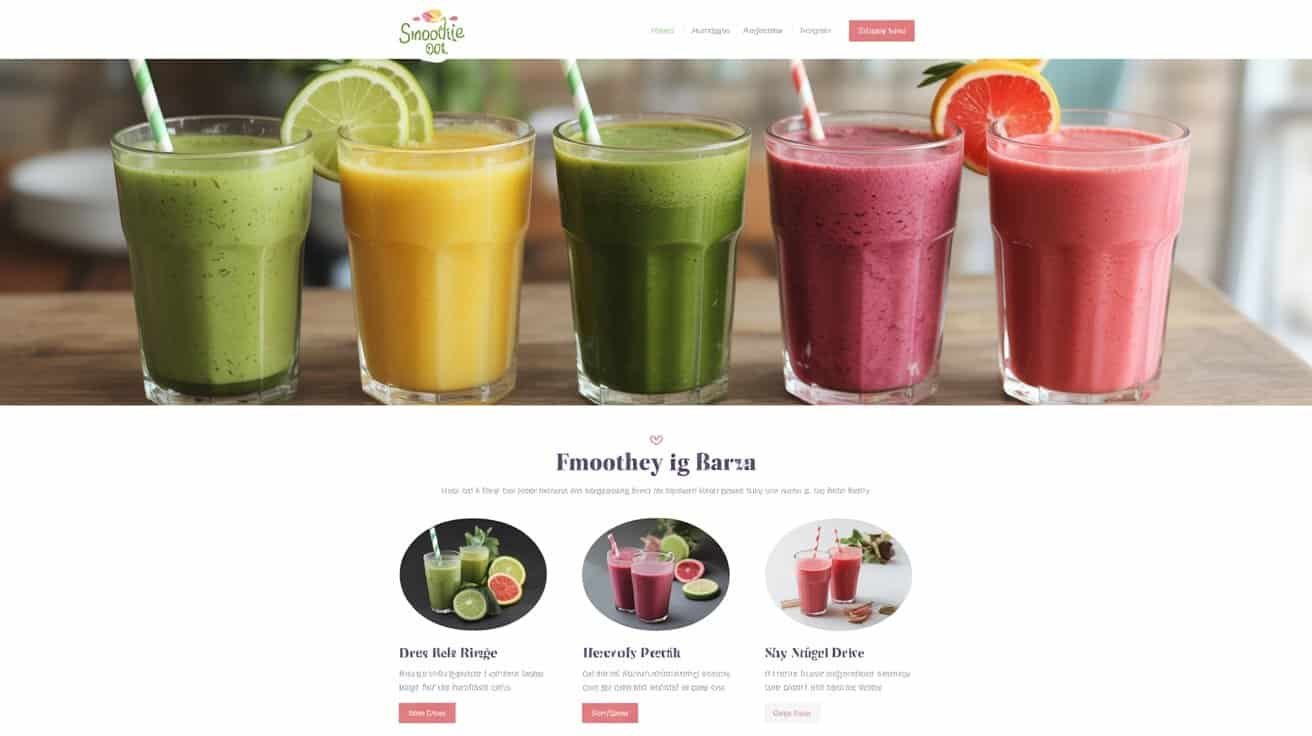
Your smoothie bar website checklist must prioritize mobile-responsive design since 60% of searches occur on smartphones, featuring touch-friendly navigation and sub-3-second loading times. Include a visually-appealing menu with nutritional information, secure online ordering integration, and optimized Google My Business listings for local SEO. Professional product photography, customer review systems, and social media integration are essential for conversion. You’ll need analytics tracking to monitor performance and identify optimization opportunities that transform browsers into loyal customers.
Key Takeaways
- Implement mobile-first responsive design with fast loading times under 3 seconds and 90+ PageSpeed score for mobile users.
- Create visual menu with nutritional information, allergy labeling, high-contrast text, and appetizing product images for each item.
- Integrate secure online ordering system with real-time inventory, mobile payments, POS synchronization, and automated customer notifications.
- Optimize Google My Business listing with accurate location details, operating hours, contact information, and high-quality photos.
- Set up conversion tracking through Google Analytics 4 and Tag Manager to monitor online orders and revenue attribution.
Mobile-Responsive Design and User Experience
When customers search for smoothie bars on their smartphones—which accounts for over 60% of local business searches—your website must deliver a flawless mobile experience or risk losing potential sales within seconds.
Mobile-first design isn’t optional—60% of smoothie bar searches happen on smartphones, making mobile optimization critical for capturing sales.
Your responsive design should automatically adjust to different screen sizes without compromising functionality. Implement responsive typography that scales appropriately across devices, guaranteeing menu items and nutritional information remain readable on smaller screens. Test font sizes between 16-18px minimum for body text to meet accessibility standards.
Touch navigation requires specific considerations for smoothie bar websites. Design buttons and menu links with adequate spacing—minimum 44px touch targets—to prevent accidental clicks when customers browse your offerings. Streamline your navigation menu into a collapsible hamburger format for mobile devices.
Optimize loading speeds by compressing images of your smoothies and ingredients. Google’s mobile-first indexing prioritizes fast-loading sites, directly impacting your local search rankings. Regular testing across multiple devices ensures consistent performance for all potential customers.
Clear and Accessible Menu Display
Your menu display serves as the primary sales tool for your smoothie bar, requiring a visual layout that guides customers efficiently through their ordering decisions.
You’ll need to make certain your menu maintains readability and functionality across all mobile devices, as most customers will browse your offerings on smartphones.
Additionally, you must integrate clear nutritional information that meets regulatory standards while helping health-conscious customers make informed choices about your smoothie options.
Visual Menu Layout
Since your smoothie bar’s menu serves as the primary sales tool on your website, its visual layout must prioritize both clarity and accessibility to convert browsers into customers.
Establish a proper font hierarchy using larger headings for categories and readable body text for descriptions.


Group similar items logically—base smoothies, protein options, and seasonal specials should occupy distinct sections.
Implement high contrast between text and background colors to guarantee readability across all devices.
Use consistent spacing and alignment to create visual order.
Include appetizing product images alongside each menu item to drive purchase decisions.
Assure your layout adapts seamlessly to mobile screens, as most customers browse menus on smartphones.
Mobile-Friendly Design
Mobile optimization determines whether your smoothie bar captures or loses the majority of your potential customers, as mobile devices account for over 60% of food service website traffic.
Your site must respond instantly to touch gestures and provide thumb friendly navigation that keeps essential elements within easy reach of one-handed browsing.
Implement buttons sized at minimum 44×44 pixels to prevent misclicks. Position your menu, contact information, and ordering system in the lower half of screens where thumbs naturally rest. Test your site across multiple devices and screen sizes to guarantee consistent functionality.
Your mobile menu should collapse unnecessary elements while prioritizing smoothie categories, prices, and location details.
Fast loading times under three seconds prevent customer abandonment during peak ordering periods.

Nutritional Information Display
Although customers increasingly prioritize health-conscious choices, many smoothie bars lose sales by burying nutritional information in hard-to-find PDFs or cluttered menu layouts. You’ll maximize conversions by displaying calories, macronutrients, and vitamins prominently alongside each smoothie option. Position nutritional facts directly within your digital menu, not as separate downloads.
Your allergy labeling must meet FDA compliance standards while remaining visually clear. Use standardized icons for common allergens like nuts, dairy, and gluten. Include ingredient sourcing details—customers want transparency about organic certifications and local suppliers.
Implement searchable filters allowing customers to sort by dietary preferences: keto, vegan, low-sugar options. Create comparison tools enabling side-by-side nutritional analysis. Your goal is instant accessibility—customers shouldn’t need multiple clicks to find essential health information that drives their purchasing decisions.
Online Ordering and Payment System Integration
Successful smoothie bars increasingly rely on robust online ordering systems that seamlessly integrate with their point-of-sale infrastructure and payment processing networks. You’ll need secure checkout functionality that protects customer data while streamlining transactions. Consider implementing recurring subscriptions for regular customers who want weekly smoothie deliveries or membership plans.
Your payment gateway should support multiple methods including credit cards, digital wallets, and mobile payments. Integration with your inventory management system prevents overselling ingredients and automatically updates availability.
| Feature | Implementation Priority |
|---|---|
| Mobile-responsive ordering interface | High |
| Real-time inventory synchronization | High |
| Automated order confirmation emails | Medium |
| Loyalty program integration | Medium |
| Third-party delivery platform APIs | Low |
Test your system thoroughly before launch, ensuring order accuracy, payment security, and seamless communication between your website, kitchen display systems, and customer notifications. Regular system updates maintain compliance with payment industry standards.
Local SEO Optimization and Google My Business Setup
Local visibility determines whether potential customers discover your smoothie bar when searching for healthy drinks, protein shakes, or quick breakfast options in your neighborhood. You’ll need to claim and optimize your Google My Business profile with accurate hours, location, phone number, and high-quality photos of your smoothies and storefront.
Configure your business categories correctly, selecting primary categories like “Juice Shop” or “Health Food Store” and relevant secondary options. Upload menu photos, interior shots, and team images to showcase your offerings. Respond to customer reviews promptly and professionally to demonstrate active engagement.
Build consistent local citations across directories like Yelp, Yellow Pages, and industry-specific platforms, ensuring your NAP (Name, Address, Phone) information matches exactly across all listings. Implement review management protocols by encouraging satisfied customers to leave feedback and addressing negative reviews constructively. These foundational steps establish your digital presence in local search results.
High-Quality Product Photography and Visual Content
Your smoothie bar’s visual content serves as the primary sales driver that converts website visitors into customers.

You’ll need professional photography that showcases your products’ vibrant colors, fresh ingredients, and appetizing presentation while maintaining consistent branding standards across all digital touchpoints.
Establishing clear visual guidelines guarantees your smoothie photography aligns with your brand identity and creates the compelling imagery necessary to drive online orders and foot traffic.
Professional Smoothie Photography Tips
Capture stunning smoothie visuals that drive sales by mastering fundamental photography principles and equipment setup.
Position your smoothies near windows to harness natural lighting, which enhances vibrant colors and creates appealing highlights.
Use shallow depth of field to isolate your product from distracting backgrounds, making smoothies the focal point.
Incorporate action shots like pouring ingredients or blending processes to showcase freshness and preparation quality.
Invest in color grading software to enhance saturation and contrast, ensuring your smoothies appear as appetizing as possible.
Maintain consistent lighting conditions and angles across all product shots to establish brand cohesion.
Clean your glassware meticulously before shooting, and consider using fresh garnishes like mint leaves or fruit slices to add visual interest and communicate ingredient quality to potential customers.
Visual Branding Consistency Standards
While exceptional individual photos matter, establishing visual branding consistency standards across all digital touchpoints determines whether customers perceive your smoothie bar as professional and trustworthy.
You’ll need defined guidelines for your color palette usage across website elements, social media posts, and promotional materials. Maintain consistent logo placement in the same position on every image – typically upper right or lower left corners work best for smoothie photography.
Create templates for different content types: product shots, behind-the-scenes content, and ingredient highlights. Establish consistent filters, lighting tones, and composition styles that reinforce your brand identity. Document these standards in a brand guide that staff can reference when creating content.
Consistency builds recognition and customer confidence in your smoothie bar’s reliability.
Contact Information and Location Details
Since customers need multiple ways to reach your smoothie bar, establishing thorough contact information serves as the foundation for building trust and accessibility. Your website must display primary phone numbers, email addresses, and physical addresses prominently on every page, particularly in the header and footer sections.
Multiple contact options displayed prominently across your website build customer trust and ensure seamless accessibility to your smoothie business.
Create dedicated contact pages featuring detailed location information, including cross-streets, landmarks, and parking availability. Integrate interactive maps with accurate pins showing your exact storefront location. Include specific operating hours for each day, noting any holiday exceptions or seasonal adjustments.
Establish clear delivery zones with corresponding service areas and minimum order requirements. This information prevents customer confusion and streamlines order processing. Consider adding staff bios on your contact page to personalize the customer experience and showcase your team’s expertise.
Implement click-to-call functionality for mobile users and make sure all contact forms include required fields for efficient communication. Test every contact method regularly to maintain operational standards.
Customer Reviews and Testimonials Section
Your smoothie bar’s credibility hinges on displaying genuine customer testimonials that showcase real experiences with your products and service.
You’ll need to implement a system that makes it easy for satisfied customers to submit their feedback directly through your website.
Authentic reviews build trust with potential customers and provide valuable social proof that drives sales conversions.
Display Authentic Testimonials
Because trust drives purchasing decisions in the food service industry, implementing an authentic testimonials section becomes essential for your smoothie bar’s website credibility. You’ll need real customer quotes that showcase specific benefits and experiences rather than generic praise. Video testimonials create stronger emotional connections and demonstrate genuine satisfaction with your products.
| Testimonial Type | Implementation | Quality Standards |
|---|---|---|
| Written Reviews | Customer quotes with names | Specific product mentions |
| Video Content | 30-60 second clips | Professional audio quality |
| Photo Reviews | Images with testimonials | High-resolution visuals |
| Social Media | Embedded posts | Verified accounts |
| Rating Systems | Star-based feedback | Aggregate scoring |
Structure your testimonials section with diverse customer demographics and varied smoothie preferences. Include date stamps and customer locations to establish authenticity while maintaining privacy standards.
Encourage User Submissions
Building on your testimonials foundation, you’ll want to set up systematic processes that draw out fresh customer feedback and maintain a steady stream of authentic reviews.
Implement automated email follow-ups 24-48 hours post-purchase requesting feedback. Install review collection widgets on your checkout confirmation pages and receipt emails.
Launch community contests encouraging customers to share photos of their smoothies with branded hashtags. Offer monthly prizes like free smoothie cards or merchandise to incentivize participation. These user submissions create valuable social proof while expanding your content library.
Establish clear submission guidelines specifying photo quality standards and acceptable content.
Monitor submissions regularly, responding promptly to reviews and featuring standout content on your homepage.
This systematic approach transforms satisfied customers into active brand advocates.
Social Media Integration and Content Strategy
Successful smoothie bars consistently leverage social media platforms to drive foot traffic, build brand loyalty, and showcase their fresh offerings. Your website must seamlessly integrate Instagram feeds, Facebook posts, and TikTok content to create a unified digital presence that converts online engagement into in-store purchases.
Embed live social media feeds directly on your homepage and menu pages. Configure automated posting systems that share daily specials, behind-the-scenes preparation videos, and customer testimonials across all platforms simultaneously. This integration reduces manual workload while maintaining consistent brand messaging.
Develop strategic Influencer Partnerships with local fitness enthusiasts, nutritionists, and lifestyle bloggers who align with your health-focused brand values. Provide them with signature smoothies in exchange for authentic content creation and audience exposure.
Create branded Hashtag Campaigns that encourage customers to share their smoothie experiences. Feature user-generated content prominently on your website’s gallery section, transforming satisfied customers into brand ambassadors who attract new business through authentic social proof.
Loading Speed and Website Performance Optimization
When customers browse smoothie options on mobile devices during their commute or gym breaks, every second of loading delay costs you potential sales. Your smoothie bar’s website must deliver lightning-fast performance to capture these time-sensitive customers.
Implement CDN services to distribute your content globally, ensuring menu images and nutritional information load instantly regardless of location. Enable Brotli compression on your server to reduce file sizes by up to 25% compared to standard compression methods.
| Performance Factor | Target Metric |
|---|---|
| Page Load Time | Under 3 seconds |
| Image Compression | 80% reduction |
| Server Response | Under 200ms |
| Mobile Performance | 90+ PageSpeed score |
| Cache Duration | 30 days static assets |
Monitor your site’s Core Web essentials monthly using Google PageSpeed Insights. Optimize high-resolution smoothie photos through WebP format conversion. Remove unnecessary plugins that slow processing. Your customers won’t wait—ensure your website doesn’t make them.
Analytics Tracking and Conversion Measurement Tools
Your blazing-fast website means nothing without data to prove it’s converting visitors into customers. Install Google Analytics 4 to track essential metrics like bounce rate, session duration, and conversion paths. Set up Google Tag Manager for streamlined tracking implementation across your smoothie bar’s digital touchpoints.
Configure conversion goals for online orders, newsletter signups, and location visits. Track revenue attribution by linking your POS system to analytics platforms. This reveals which traffic sources generate actual sales versus just website visits.
Implement A/B testing for critical elements like menu layouts, call-to-action buttons, and promotional banners. Test different smoothie photography styles and pricing displays to optimize conversion rates.
Create funnel mapping to identify where potential customers drop off during the ordering process. Monitor mobile versus desktop performance separately, as smoothie customers frequently browse menus on smartphones. Establish monthly reporting schedules to review performance trends and adjust marketing strategies based on concrete data rather than assumptions.
Frequently Asked Questions
What Legal Disclaimers Should I Include Regarding Allergens and Health Claims?
You’ll need a thorough allergen statement listing all common allergens present in your ingredients, including nuts, dairy, soy, and gluten. Include a health disclaimer stating that smoothies aren’t intended to diagnose, treat, cure, or prevent diseases.
Add warnings about consulting healthcare providers before consumption if customers have medical conditions. Clearly state that nutritional information is approximate and you can’t guarantee allergen-free preparation due to shared equipment.
How Often Should I Update Seasonal Menu Items on My Website?
You should update seasonal menu items every 6-8 weeks to maintain customer interest and capitalize on ingredient availability. Establish menu rotations that align with seasonal produce cycles – spring detox blends, summer tropical options, fall harvest flavors, and winter immunity boosters.
Create a content calendar that schedules these updates consistently, allowing adequate time for staff training, inventory adjustments, and marketing preparation before each shift.
Should I Offer Franchise Information or Business Partnership Opportunities Online?
You should include a dedicated franchise page if you’re actively seeking expansion partners and have established operational systems, brand standards, and financial requirements.
Create a professional partnership inquiry form to capture qualified leads and screen potential franchisees.
However, don’t add franchise information prematurely—ensure you’ve proven your business model, developed thorough training programs, and can provide ongoing operational support before promoting expansion opportunities.
What Backup Systems Do I Need if My Website Crashes Unexpectedly?
You’ll need automated offsite backups stored on separate servers, real-time monitoring alerts that notify you instantly when your site goes down, and a reliable hosting provider with redundancy systems.
Set up daily database backups, maintain current website files in cloud storage, and establish a rollback protocol.
Configure monitoring alerts through services like Pingdom or UptimeRobot to catch outages immediately and minimize customer disruption during peak ordering hours.
You’ll need an inventory management system that triggers real time notifications when ingredients drop below threshold levels.
Configure your website to automatically disable affected smoothies or offer temporary substitutions with similar nutritional profiles.
Display clear messaging about unavailable items and suggested alternatives.
Set up automated customer alerts for popular items returning to stock, ensuring you maintain service standards while managing expectations transparently.
Conclusion
You’ve established the foundation for a competitive smoothie bar website. Execute these nine critical components systematically—prioritize mobile optimization and fast loading speeds first, then integrate seamless ordering systems. Don’t skip local SEO setup; it’ll drive foot traffic directly to your location. Monitor your analytics religiously to identify conversion bottlenecks and optimize accordingly. Your website isn’t just marketing—it’s operational infrastructure that’ll determine whether customers choose you over competitors.
Table of Contents
- 1 Key Takeaways
- 2 Mobile-Responsive Design and User Experience
- 3 Clear and Accessible Menu Display
- 4 Online Ordering and Payment System Integration
- 5 Local SEO Optimization and Google My Business Setup
- 6 High-Quality Product Photography and Visual Content
- 7 Contact Information and Location Details
- 8 Customer Reviews and Testimonials Section
- 9 Social Media Integration and Content Strategy
- 10 Loading Speed and Website Performance Optimization
- 11 Analytics Tracking and Conversion Measurement Tools
- 12 Frequently Asked Questions
- 12.1 What Legal Disclaimers Should I Include Regarding Allergens and Health Claims?
- 12.2 How Often Should I Update Seasonal Menu Items on My Website?
- 12.3 Should I Offer Franchise Information or Business Partnership Opportunities Online?
- 12.4 What Backup Systems Do I Need if My Website Crashes Unexpectedly?
- 12.5 How Do I Handle Online Orders When Ingredients Are Temporarily Unavailable?
- 13 Conclusion






No Comments